
Customized Pi-coding-agent packages
Taste matters.
Recently I switched from other coding-agents (claude-code, kimi code, codex, …) to Pi for >90% daily works. After a few weeks the setup had sprawled: permission presets, a custom theme, markdown transformers, keybindings, and other file-managements improvements. The reasons are: 1) Pi is light-weighted. After the increasingly enforcement of LLM’s ability for harnessing, lots of scanffolds and fences earlierly (e.g., in CC) are unnecessary anymore. Adversely, they waste tokens for nothing, which makes Pi more competitive. 2) Subscription crisis. My claude accounts got frequently banned by anthropic. After getting disappointed with A\, I realized that I can’t hang on one tree. Now I have lots of subscriptions and API, but switching between coding-agents is annoying. So I need a reliable harness tool with long-term stability. 3) I love TUI and DIY. Pi is born for DIY.
Basicly, original Pi only have four fundamental tools and a simple TUI (which just prints everything and flood out on your screen). It doesn’t have fences, so it just run on your machine naked without permission block. Pi herited my skills from other agents. I built visibility enhancements on TUI (The TUI of Pi itself is good actually, better than my thinking) suiting my habit and I learnt a lot from grok built btw (I love grok build).
I manage all my settings in an independent repo aside from Pi package so it wont be overrided by Pi’s update. And I am continuingly improve the settings/functions and also looking for useful extensions based on my increasing new demands and practice. Now I am glad to share it.
Highly recommend Maple Mono font, an opensource monospace font, if you’re Chinese users.
Here is the overall looking:
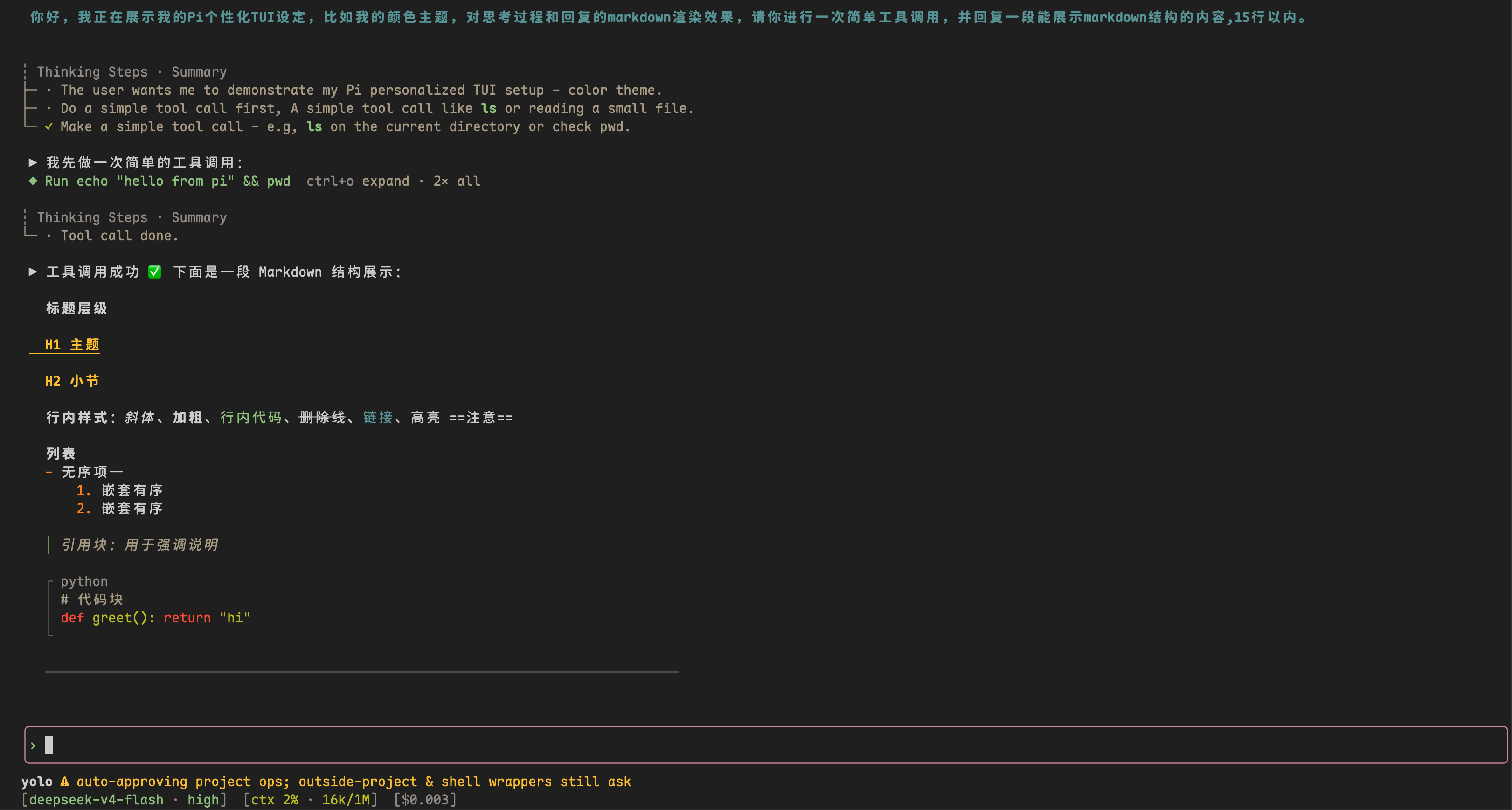
The following contents were written by my agent introducing the features.
One-liner
Pack every personal customization of pi — 8 extensions, a theme, agent config — into a git-managed repo. Install it with pi install git:github.com/JohnFengg/pi-config, or point pi at a local path so the working tree is the live config.
Layout
extensions/ personal extensions (auto-loaded as a pi package)
themes/ gruvbox-dark
config/ non-package resources, symlinked into ~/.pi/agent/ by install.sh
tests/ node scripts that pin render / permission behavior
install.sh one-shot machine bootstrap
package.json declares the package surface:
{
  "name": "pi-config",
  "pi": {
    "extensions": ["./extensions"],
    "themes": ["./themes"]
  }
}
Everything else — settings.json, keybindings, MCP/models (no secrets), statusline, the static baseline for pi-permission-system, APPEND_SYSTEM.md — sits under config/ and gets symlinked into ~/.pi/agent/ by install.sh. Credentials (auth.json) deliberately stay out of the repo; a fresh machine still needs /login.
The eight extensions
1. permission-presets.ts — session-scoped authority
Four presets, cycled with shift+tab (or /permission-preset):
| Preset | Behavior |
|---|---|
| default | reads allowed; everything else asks |
| readonly | write / edit / bash denied outright |
| yolo | auto-approve project ops; still ask for shell wrappers (sudo, eval, bash -c, find -exec…) and outside-project paths |
| auto | auto-approve everything, wrappers included — outside-project access still asks |
The last floor is not optional. pi-permission-system’s bounded-delegation envelope caps any authorizer’s allow on external_directory / path (and on asks whose surface can’t be determined) back down to defer. A link can only tighten, never lift that engine floor.
The important design choice: the preset never touches a config file. It lives in process memory (Symbol.for(...) on globalThis) and plugs into the permission system’s authorizer chain via registerAuthorizer. One window on yolo does not drift another window onto yolo. That used to be a real bug when the “preset” was a rewrite of the global config.json.
2. assistant-gutter.ts — hanging indent for assistant prose
Tool rows render as ◆ Run … (icon at column 1, text at column 3). Assistant text gets the same geometry: a ▶ on the first content line, two spaces of continuation indent on soft-wrapped lines.
This is a render-layer patch on Markdown.render, not a rewrite of the Markdown source. Soft-wrapped continuation lines still indent correctly because the component produces them after the source has already been transformed. Glyph note: U+25B6 measures width 1 in pi-tui’s visibleWidth (same East Asian Ambiguous class as ◆). If a terminal ever paints it wide or blank, swap the icon to ❯ or ASCII >.
3. restore-assistant-transformers.ts — keep markdown transformers alive
A compatibility shim. The third-party pi-thinking-steps package replaces AssistantMessageComponent.updateContent and drops options.transform in the process, which silently disables every assistant-side markdown transformer (gutter, mermaid, …). This extension re-attaches those transformers after foreign patches land, so the rest of the display stack keeps working.
4. user-message-bold.ts — bold user blocks, structure-aware
A display-layer transformer: bold the user’s text, but leave list/heading/quote markers alone, and skip fenced code and tables entirely. Looks like emphasis, not like broken Markdown.
5. compact-tool-activity.ts — one-line tool rows
Every tool call collapses to a single line (◆ Run … / ✓ Edit …). Expand one block with ctrl+o (or cmd+o); double-tap within 400 ms expands all. Per-block state, not a global flag.
Why double-tap instead of ctrl+shift+o? Most terminals cannot distinguish Ctrl+Shift+O from Ctrl+O unless Kitty keyboard protocol / modifyOtherKeys is on. Double-tap works everywhere. The built-in app.tools.expand binding is deliberately unbound in keybindings.json so this extension owns the chord without fighting the stock handler.
6. compact-code-blocks.ts — terminal-bordered code regions
Fenced code renders as a terminal region, without literal backtick fences:
┌ ts
│ const x = 1
└
Implemented by patching Markdown.renderToken for type === "code".
7. compact-markdown.ts — tighter model output
A small system-prompt injection that nudges the model toward denser Markdown. Cheap, effective, easy to turn off.
8. thinking-tool-spacing.ts — spacing, and a coexistence pattern
Fixes the gap between thinking blocks and tool rows. More interestingly, it demonstrates the same re-assert-after-foreign-patch pattern used by restore-assistant-transformers: install once at load, install again on a session_start microtask, so a third-party prototype patch that lands later cannot leave you in a half-applied state.
Theme: gruvbox-dark, quiet on purpose
The stock gruvbox is fine. The one tweak that matters for me: user message blocks drop the light-gray background. No background, bold deep blue (#458588) — same terminal canvas as the agent, distinguished only by color. Less chrome, more signal.
Config that is not a package
install.sh symlinks the non-package surface into place and then pi installs the local path:
settings.json— default model, package list, subagent model overrideskeybindings.json— including the unboundapp.tools.expandnoted abovemcp.json/models.json— shapes only, no keys- statusline configs
pi-permission-systemstatic baseline ("*": "ask", reads allowed,authorizerChain: ["session-preset"])APPEND_SYSTEM.md— currently the terminal math-readability rule (Unicode/plain first, LaTeX only as a follow-up fence)fd-ignore+gitignore_global— kill macOS._*/.DS_Storenoise in pi’s@file search and in git
On a machine where this repo is the source of truth, ~/.pi/agent/*.json are symlinks into the working tree. git checkout <commit> -- . followed by /reload inside pi is a full rollback. pi writes settings with ordinary writeFileSync (not atomic rename), so its own writes land in the working tree and show up in git status — package installs included.
Install
From zero (full setup: extensions + theme + agent config via install.sh):
npm install -g --ignore-scripts @earendil-works/pi-coding-agent
git clone https://github.com/JohnFengg/pi-config.git
cd pi-config && ./install.sh
pi   # first start installs packages from settings.json; then /login
Extensions and theme only, no machine config:
pi install git:github.com/JohnFengg/pi-configThe git-installed copy is owned by pi’s package manager — pi update will git clean and reset it. Don’t edit inside the managed clone. For day-to-day hacking, install from a local checkout instead (pi install /path/to/pi-config) so the working tree is the live source.